Ever had an experience onboarding someone, where you had to provide them a handful of documents, all authored at different times, and in various states of completeness?
Ever had your AI agent burn cycles pulling down that same documentation, understanding it, and summarizing it, before it finally responds?
If you’ve experienced either, then you’ve probably watched the same expensive reasoning happen over and over again. Each new hire struggles to reconcile and understand the current and historical state of your projects. Likewise, each new AI session works to reconstruct the same understanding. The original information is the same, but the effort required to make sense of it gets repeated every time.
This guide is focused on empowering you to start solving this by building your own local version of the Derived Knowledge Base. The general idea: you hand your scattered sources to Claude, it reads them and takes notes, and you end up with a tidy, cross-linked knowledge base that both people and agents can use. From there, you can keep feeding it more content (new source documents) or more compute (asking the agent to improve what’s there).
I work on the Agentic Search team at Salesforce, and we have been using this approach since January to help us and our agents navigate, understand, and improve our documentation and code. By the end of this guide, you will have built this locally, in about half an hour, with no service to deploy and nothing to wait for. If you can make a folder and copy-paste a prompt, you can do this.
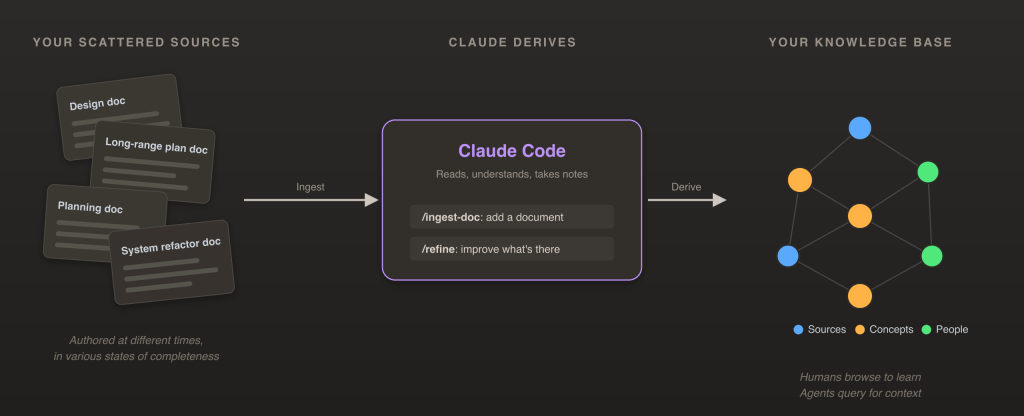
By the end of this guide you’ll have built that locally, in about half an hour, with no service to deploy and nothing to wait for. If you can make a folder and copy-paste a prompt, you can do this.
What is a Derived Knowledge Base?
Let us define a Derived Knowledge Base as an agent-written collection of interconnected notes. You point an agent at your own potentially messy sources: design docs, product initiative proposals, Slack threads, and whatever other content your team produces. Then, the agent generates a set of clean, synthesized, cross-linked notes from them. The difficult and painstaking task of maintaining a current and complete “per-concept” set of knowledge is now the responsibility of the agent itself. In short: it’s generated from your team’s existing documentation, rather than authored by hand.
As hinted at earlier, two kinds of readers can get value from this:
- Humans browse it to onboard, to learn a system, to figure out who decided what and why. Acronyms and tribal knowledge are baked into a cohesive unit.
- Agents search it for cheap, fast, and consistent context. Instead of re-deriving your whole architecture from source documents at the start of every single session, that compute is done up-front and persisted.
It helps to be clear about what this is not. It’s not a vector database you have to stand up and operate. Likewise, this is not a replacement for Retrieval Augmented Generation (RAG). Instead, it complements RAG by giving AI agents a high-quality layer of synthesized context to consult first, before digging into the original source documents. It’s also not a structured knowledge graph with a strict ontology. It’s just plain Markdown files in a folder. Other, more structured systems can be built on top of or alongside this, but this simple structure on its own will unlock a huge amount of value as a starting point.
There’s an often-referenced idea in AI, Richard Sutton’s “bitter lesson”, that the methods which win over time are the general ones that let computation do the work, rather than the ones where we lock a fixed structure into the system up front. It is tempting to hand-design the perfect hierarchy of categories, tags, and relationships before an agent ever sees your documentation. The problem is that those structures become another artifact your team has to maintain. As systems evolve and documentation grows, the organization approach itself can become outdated.
Furthermore, real relationships between concepts are rarely so clean: they’re partial, conditional, and sometimes contested (“A depends on B, but only in our legacy implementation, and the team doubted it’d survive the redesign”). A rigid structure, even a knowledge graph with a confidence score on each edge, flattens that nuance into fixed labels. However, written prose carries this nuance, and its looseness isn’t a loss of accuracy, but rather a core strength for representing knowledge that’s often inherently fuzzy.
So we are starting here not just because it is the simpler, more general approach, and one that scales well with compute and data volume, but also because language turns out to be the right tool for the job: an approximately accurate view of an approximate world.
We’ll be discussing four verbs often throughout the rest of this post:
- Ingest: bring sources in
- Derive: let the agent write notes from them
- Query: ask a question about the notes
- Refine: spend compute to make the notes better
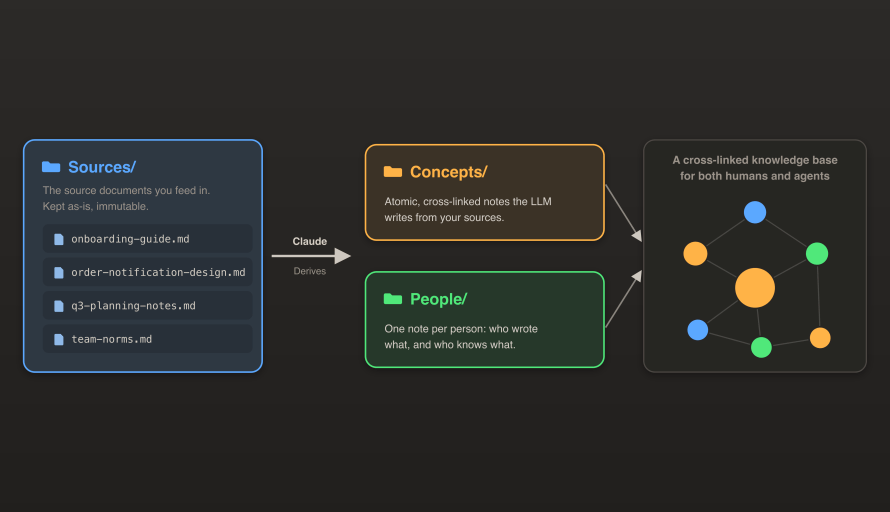
The one principle underneath all of it: you provide the sources, while Claude writes all of the output. This includes notes about concepts, people, and the links between them. Your sources stay frozen and immutable, and the derived notes evolve as you add data (with ingest) and compute (with refine).
Overview: Folders, Some Guidelines, and Two Skills
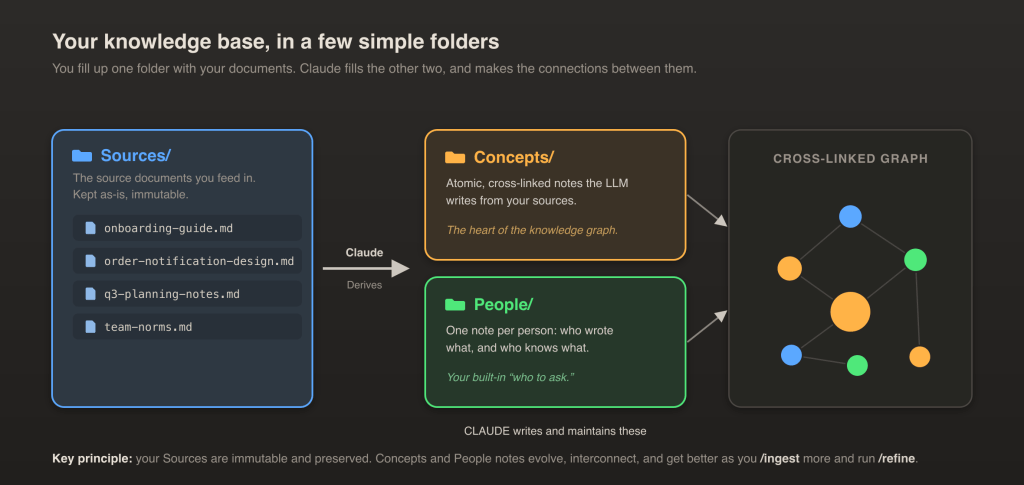
Think of these folders as the working memory of your AI knowledge base. Together, they create a persistent representation of your team’s engineering knowledge. Any content you provide is fully preserved, but the derived knowledge from the agent is allowed to evolve over time.
Your knowledge base is just a collection of Markdown files, with three kinds of notes:
- Sources/: the documents you add as input. Claude keeps the content of these untouched, so they stay trustworthy. In other words, they’re immutable: once a source is added, it doesn’t get rewritten.
- Concepts/: cross-referenced notes, each about a specific concept, which Claude writes as it reads and understands your source material.
- People/: one note per person Claude finds in your sources: what they wrote, and what they seem to know about.
Keep it simple by design: there are no categories or tags you have to learn, and no required structure. If you ever want finer organization, you can ask for it later, but let’s prioritize getting the basics working today.
Then, there are two more pieces. First, guidelines for Claude: a pair of plain-English files, CLAUDE.md and CONVENTIONS.md, that tell Claude how notes should look and link together. Happily, you won’t hand-write these either, since in the next step, you’ll have Claude generate them for you.
And finally, two skills: /ingest-doc to add a document, and /refine to improve what’s already there. These are Claude Skills: saved prompts which Claude can run on demand. And yes, you’ll be prompting those into existence as well.
So, once this is built, the division of labor when using it is fairly straightforward:
- You provide Sources.
- Claude extracts Concepts, identifies People, and builds the cross-links.
What You Will Need Before You Start
Not much! Note that while this guide is written for Claude Code to keep things specific, if you’d rather use another agent, just point it at this blog, and it can almost certainly help you adapt it through all of what follows.
- Claude Code, installed and signed in (grab it here).
- A terminal you can paste commands into.
- Documents you can feed into the system. Two documents which are at least semi-related is perfect, but the more the merrier.
- Optionally, Obsidian (it is free) for the pretty graph view at the end. You don’t need it to get value, but it’s quite nice to look at. The screenshot in this post is from our own custom web UI, which you can take a crack at creating your own instance of as well, but Obsidian is a great shortcut to viewing your connected knowledge base.
You’ll also want one document you know well: a design doc, an onboarding guide, a project README, anything. Export it to Markdown (in Google Docs, File → Download → Markdown; most documentation tools have a similar export). Pick something you understand, so you can sanity-check what Claude derives from it.

Step 1: Set Up Your Knowledge Base (about 10 minutes)
Let’s get our system built. You’re going to describe what we want to build, and Claude is going to do the heavy lifting.
First, make a folder and open Claude Code in it:
mkdir my-knowledge-base && cd my-knowledge-base
claude
Now paste the following prompt, sending it Claude’s way. Make sure to give it a read on your own first.
I want to set up a "derived knowledge base" in this folder. Do the following:

1. Create three folders: Sources/, Concepts/, and People/.
2. Write a CLAUDE.md and a CONVENTIONS.md that explain the rules below, so any
   future Claude session working in this folder knows what to do. All files should be in
   Markdown format, and named clearly.
3. Create two skills: "ingest-doc" and "refine".

The rules:
- Sources/ holds documents which I've had you ingest. Keep them untouched,
  except for frontmatter at the top (title, author, date written, source URL, last refined date). Treat the source document as immutable: never modify its content.
- Concepts/ holds concisely named notes of ~1,000 lines or less, that you write as you learn from reading Sources. One idea per note. Define the idea clearly, link related concepts with [[double-bracket links]], and end with a "Sources" section linking back to where it came from. You can decide when to add, modify, or delete Concepts as you perform ingestion or refinement work. You can similarly decide which frontmatter tags to add and remove from concepts. When a newer source contradicts an older one, describe the current state and consider keeping a reference to the old when feasible.
- People/ holds one note per person you find in the Sources: what they wrote and
  what they seem to know about. Link them to the concepts and documents they touch.
- When answering a user's question, search through Concepts and People, and provide citations to Sources when applicable.

/ingest-doc <path>: read the document at <path>, ask me for its {title, author, written date} if these aren't obvious, copy it into Sources/, add frontmatter, then create or update the relevant Concept and People notes and cross-link everything. Print a short summary.

/refine [N]: re-read the N least-recently-refined sources (default 1), update a "last refined date" frontmatter attribute, and improve them. Fill gaps, add missing [[links]], create any missing Concept or People notes. Never modify anything in Sources/.
Claude will go create the folders, write CLAUDE.md and CONVENTIONS.md, as well as the two skills.
Quick sanity check: type / and confirm /ingest-doc and /refine show up in the list. If they do, you’re done with setup.
Step 2: Ingest Your First Doc, and Derive Knowledge (about 10 minutes)
Here is where it gets fun. Feed in the document you picked:
/ingest-doc ~/Downloads/order-notification-design.mdClaude will confirm the file and ask for any missing information.
Then, it adds a little frontmatter (a metadata block at the top of a Markdown file), files the doc into Sources/ untouched, and then derives: it writes new Concept notes, identifies the People mentioned, and cross-links all of it. When it is done, it prints a summary:
Ingested: order-notification-design.md → Sources/
  Concepts:  3 created  (Order Notification Service, Retry Policy, Webhook Delivery)
  People:    2 created  (G. Lee, S. Patel)
  Cross-links added: 8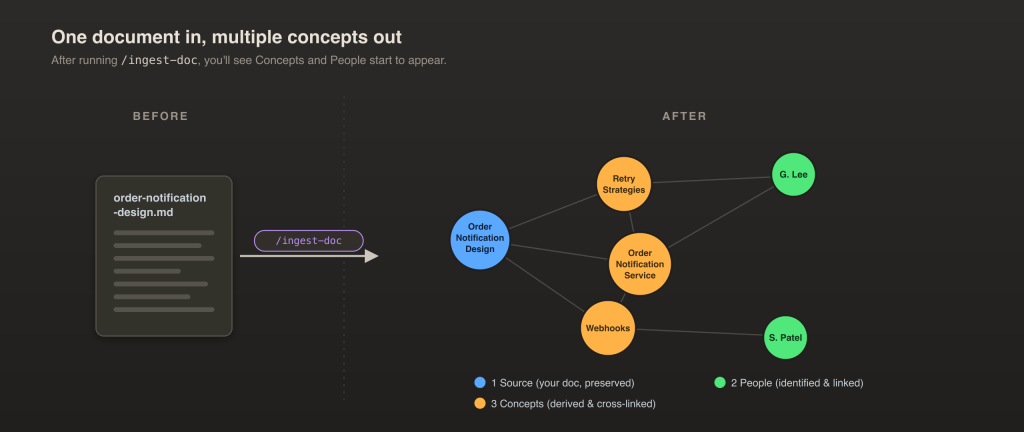
Now open up a generated Concept note (here, Concepts/Order Notification Service.md) and read what Claude wrote. It should be a simple, well-structured document. Here’s our example output:
# Order Notification Service

Sends customers updates about their orders (confirmed, shipped, delivered)
across email and SMS. Owned by the Notifications team.

## How it works
1. An order event arrives on the queue.
2. The service picks the channel based on customer preference.
3. Delivery is attempted, with retries on failure (see [[Retry Policy]]).

## Related concepts
- [[Retry Policy]] — how failed sends are re-attempted
- [[Webhook Delivery]] — how downstream systems get notified

## Sources
- [[order-notification-design.md]] — original design doc (G. Lee, 2025)
Notice that the source document was left alone: all the new written content is in the derived notes, which keeps your originals trustworthy and gives the agent complete freedom to rearrange the output as it learns more (either through additional documents, or from more “effort”/compute).
So, that was the ingest and derive process. Throw your other document(s) through this, and you should start seeing the Concepts/ folder built out, ideally with the same concept updated multiple times (this means you’re getting cross-linking working).
Step 3: Refine (about 5 minutes)
Refinement lets your AI agents accumulate understanding and improve your knowledge base over time, without the need for new source material.
So, maybe it has been awhile, and a new model has been released, and you would like a more powerful agent to revisit the older one’s attempts at note-taking. Or, maybe you’ve ingested many related documents and things have become “complicated”, and could use some more editorial passes. Either way, /refine is our solution.
Let’s run:
/refineThis re-reads your least-recently-refined source document, and improves any related concepts. You should see the agent fill in gaps, add missing [[links]] (those double-bracket references are how notes point at each other), and create any concept or person it missed the first time. Think of it as a tireless editor doing another pass over everything.
Want more? Add a number:
This is essentially a “throw compute at it!” button: the more effort you send at the knowledge base, the better and more connected your corpus tends to get. Quality scales with budget (up to a limit, of course), and the budget is just compute, no human authoring required.
Want more? Add a number:
/refine 5
Keep in mind that refine is purely additive, and doesn’t touch your immutable Sources/ folder. Kick off a few passes, go refill your coffee, and come back to a richer, better-linked knowledge base than you left.
Step 4: Ask Your Knowledge Base (about 5 minutes)
You have ingested, you have derived, you have refined. Time for the payoff!
Browse it, as a human. If you installed Obsidian, open your folder in it. Click a node, take a look at its connections, and follow a thread from a concept to the person who owns it. If you don’t want to grab Obsidian, feel free to ask Claude to help you build your own interface (as we have), so you can visualize your content.
Ask it, as you’d ask a colleague. In the same Claude session, just ask a question directly:
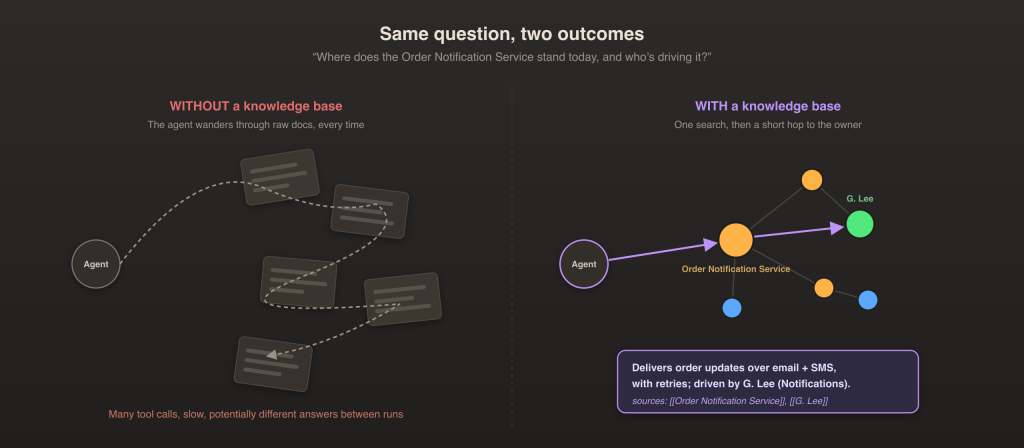
“Where does the Order Notification Service stand today, and who is driving it?”
The knowledge has already been synthesized, so Claude can spend less effort reconstructing context and responding with an answer. Here are a few questions worth trying out:
- “Who should I ask about X?”: investigates your People notes; it’s a built-in “who to ask.”
- “When was Y last worked on?”: relies on the dates in your notes’ frontmatter.
- “What’s changed about Z over time?”: uses the history which your notes track across multiple docs.
- “I am new here, what should I read first about X?”: leans on the concept summaries to provide relevant source links
- “How do X and Y relate?”: traverses the cross-links between concepts.
So now, instead of meandering through many documents to understand concepts each session, the agent can start with a concept-first understanding, and dig into sources as necessary:
Without the knowledge base, an agent has to slog through a pile of documents. This means many tool calls, a slow response time, and often a slightly different answer each run. With it, the agent runs a more targeted search against the derived notes and comes back with a fast, more consistent, and well-cited response. In general, this means fewer cycles spent re-deriving the same understanding and the same answers.
So, the two problems we opened with are now solved. The newcomer browses a clean map instead of chasing five half-finished docs. Likewise, an agent searches a curated corpus instead of rediscovering your project history and current state from scratch.
What it Costs, and What to Expect
Before you run this in a loop while you’re on a weeklong vacation, keep the following in mind.
Cost. Both ingestion and refinement are just Claude reading and writing, so progressing through a large document set will burn through usage the same way any large task would. The upside is that all of that work is preserved in the knowledge base. Still, start small to verify that you’re not spending an unexpected amount.
Trust. Every derived note cites its sources, so any claim is one click from the original. However, while your AI agent is a tireless editorial assistant, it’s not perfect. So, think of this knowledge base as a map of the world, rather than the world itself. If you’re making a decision based on the derived content, absolutely do your own verification as you use it, and read critically.
Disposability. The Concepts/ and People/ folders are fully derived, so you can blow them away and regenerate the whole corpus if you change models or improve your prompts. Nothing here is fragile or locked in.
Bonus: Make it Yours, and Let it Grow
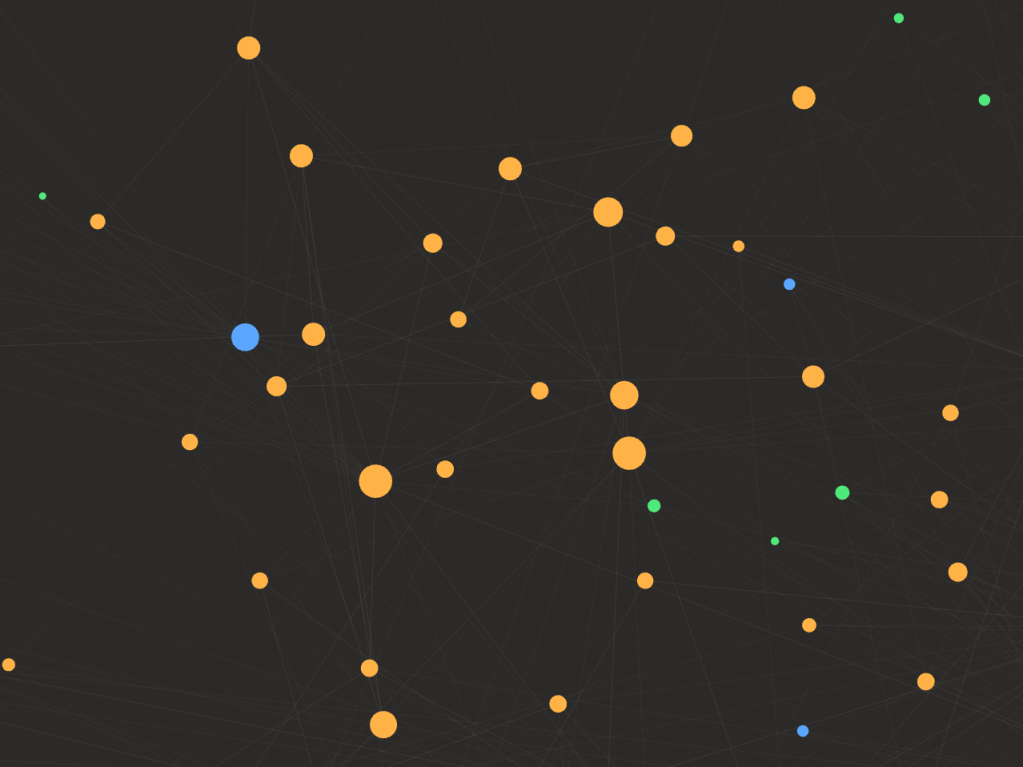
Above: a constellation of connected Concepts, People, and Sources within our team’s derived knowledge base.
Once you get this humming along, the natural next move is to teach it a source type specific to your own world. You already know how: have Claude write you a brand-new /ingest-… skill, the same way we wrote the first two back in Step 1. Consider going after whatever your team struggles with and relies upon most often. For us, that was code repositories, and our knowledge base now tracks hundreds of them. For you, it might be support tickets, customer-call transcripts, contracts, research papers, or incident postmortems. The same pattern works anywhere your team repeatedly derives understanding from technical documentation or organizational knowledge.
Feel free to build a UI layer, iterate on the citation behavior, add quality evaluations, or perhaps take a pass at automating ingestion, and scheduling refinement. Whatever improvement you can think of!
See how far you can push it. Today, ours has many hundreds of concepts and people notes, all derived from hundreds of source documents and code repositories, a constellation that has been continuously growing for over 6 months.
This general pattern will no doubt show up in products across our industry, and within agent memory systems. In fact, it already is: in April, Andrej Karpathy popularized a very similar pattern under the name “LLM Wiki”, and more productized flavors such as Google Code Wiki have been public since late last year. But the point of this post is this: you do not have to wait for a product release, for me, or for anyone else to hand you the path forward. The building blocks are already in your hands. Go forth and build!
Learn More
- Stay connected by joining our Talent Community.
- Explore our Technology and Product teams to see how you can get involved.